MCP reference
Connect Claude, Codex, Cursor or another MCP client and learn every tool exposed by Clout Browser.
On this page
The MCP server lets an AI agent discover and manage profiles. Starting a profile returns its CDP endpoint so a browser-capable agent can drive the actual fingerprinted browser.
Connect your client
- Open Clout Browser and MCP & Local API.
- Enable the Local API and save its settings.
- Install Node.js 22.5 or newer for the bundled MCP server.
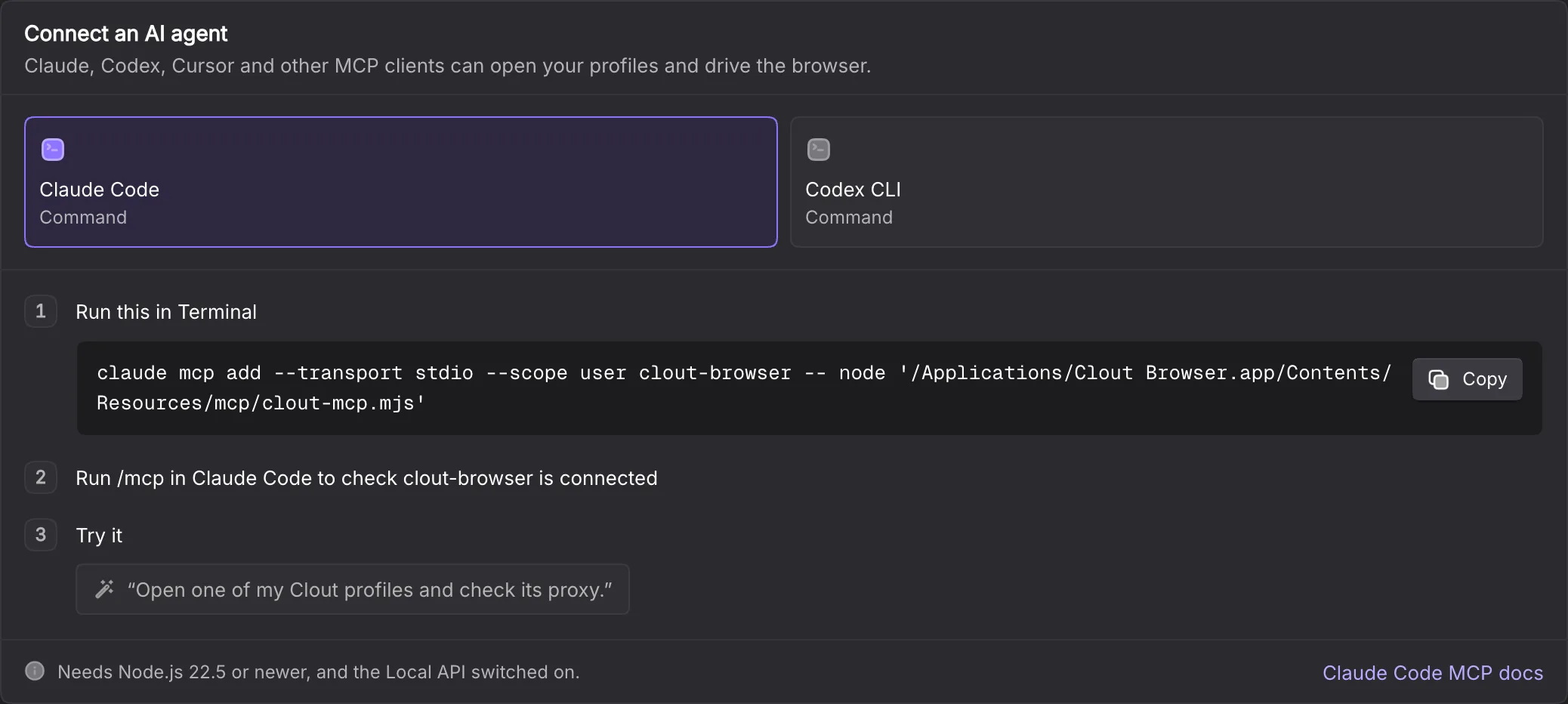
- In Connect an AI agent, choose your client.
- Copy the generated command or configuration and follow the displayed steps.
- Check the client’s connection, then ask it to inspect a profile before opening one.
The separate cloutctl release requires Node 24 or later. Do not confuse that requirement with the MCP card’s minimum.
The setup page offers Claude Code, Claude Desktop, Codex CLI, Cursor, VS Code, Windsurf and Other. Commands and file paths are computed for your installed app and operating system; use those displayed values instead of copying a macOS path onto Windows.
| Client | Setup shown by Clout | Connection check |
|---|---|---|
| Claude Code | claude mcp add command | Run /mcp |
| Claude Desktop | mcpServers entry | Quit completely, reopen and check Connectors |
| Codex CLI | codex mcp add command | Run codex mcp list |
| Cursor | ~/.cursor/mcp.json entry | Cursor Settings → MCP |
| VS Code | code --add-mcp command | Chat → Agent mode |
| Windsurf | ~/.codeium/windsurf/mcp_config.json entry | Refresh its MCP panel |
| Other | Generic mcpServers entry | The client’s own connection view |
Clout’s server uses stdio transport. The client launches node with the bundled clout-mcp.mjs path. The server discovers the running Local API address and reads its token from the local store; the normal generated setup does not embed a token.
Profile targets
Single-profile tools accept profile_id or profile_no. Always supply one: the tool schemas do not require it, and get_profile without a filter can return the first listed row. Start with list_profiles; names and IDs are not interchangeable. Use profile_status to reconnect to an already open browser.
Tool reference
| Tool | Inputs | What it returns or changes |
|---|---|---|
list_profiles | Optional group_id, page, limit | Profile page; page defaults to 1, limit to 10 and is capped at 100 |
get_profile | profile_id or profile_no | One v2 list record or “No profile with that id or number.”; not a full fingerprint document |
profile_status | Target | Whether it is open and its CDP endpoint |
start_profile | Target, optional headless, delete_cache | Opens it and returns the endpoint; an open profile returns the existing endpoint |
stop_profile | Target | Closes its browser and keeps the session |
create_profile | Required name; optional group_id, remark, user_proxy_config | New profile with a fresh fingerprint |
update_profile | Target and optional name, remark, group_id, user_proxy_config | Changes supplied values without touching fingerprint |
list_groups | None | Compatibility category list containing 0, Other; not the workspace’s profile groups |
list_folders | Optional flat | Folder tree or flat list |
file_profiles | Required profile_ids, folder_ids; optional mode | Adds, removes or replaces folder membership; mode is add, remove or set, default add |
list_proxies | None | Saved proxies and last checks |
check_proxy | Required proxy_id | Connection outcome and exit location |
list_extensions | None | Available extensions and use |
browser_status | None | Current profile and concurrent-window limits |
user_proxy_config uses the Local API’s nested proxy fields; see Local API. Omitting it on create means a direct connection.
start_profile defaults to a visible browser. delete_cache defaults to false and requests cache clearing when it closes. A first launch may take minutes while the engine downloads.
Give the agent a bounded job
For example: “List the profiles in this workspace. Open the profile named Creator A · X, check its proxy, then stop it when finished.” The agent should use the returned ID after listing.
A launched browser carries the profile’s session, not an empty testing context. Treat permission to operate it as permission to act through that account. Agree on the job before handing it over.
The MCP tool set does not expose profile deletion, billing changes or fingerprint re-rolling. Those remain deliberate operations through their other product surfaces.
Connection failures
Keep Clout Browser running, the Local API enabled and Node available to the client process. If the app says “The MCP server is missing from this installation. Update or reinstall Clout Browser.”, follow that instruction.
If your app data is in a nonstandard location, the MCP discovery code accepts CLOUT_APP_SUPPORT_DIR. Set it in the client’s environment only when it points to the actual app support directory.
A local API port conflict is fixed in Clout, not by pasting a stale port into every client. Troubleshooting has the common cases.
Limits and failures
For a group ID, read group_id from a listed profile or use GET /api/v1/group/list through the Local API. The MCP tool named list_groups currently calls the category endpoint.
The MCP client unwraps the Local API envelope. A nonzero code becomes a tool error even when HTTP returned 200. Normal calls time out after 120 seconds, proxy checks after 60 seconds and starts after 300 seconds. A timeout is not proof that a profile failed to start; use profile_status before retrying.
The server re-reads discovery on each call, so an app restart can change the address without changing your MCP configuration. The server masks recognised password, cookie, token and two-factor-seed keys recursively before returning tool results. Other profile metadata still reaches your MCP client; keep tool output private. Check a profile’s signed-in state in the browser rather than assuming a successful start proves the session is valid.