API and MCP reference
Use Studio’s authenticated API and connect a read-only MCP assistant to the selected workspace.
On this page
Studio has an authenticated HTTP API and a hosted read-only MCP server. An organization API key and an assistant connection have different permissions. Keep an organization key on your server.
API address and authentication
The API under the Studio app is https://app.cloutlabs.co/studio/v1. Account → API & MCP → API displays the current API base URL and links to Open API documentation.
The interactive reference is at Studio API documentation; the schema is at OpenAPI JSON.
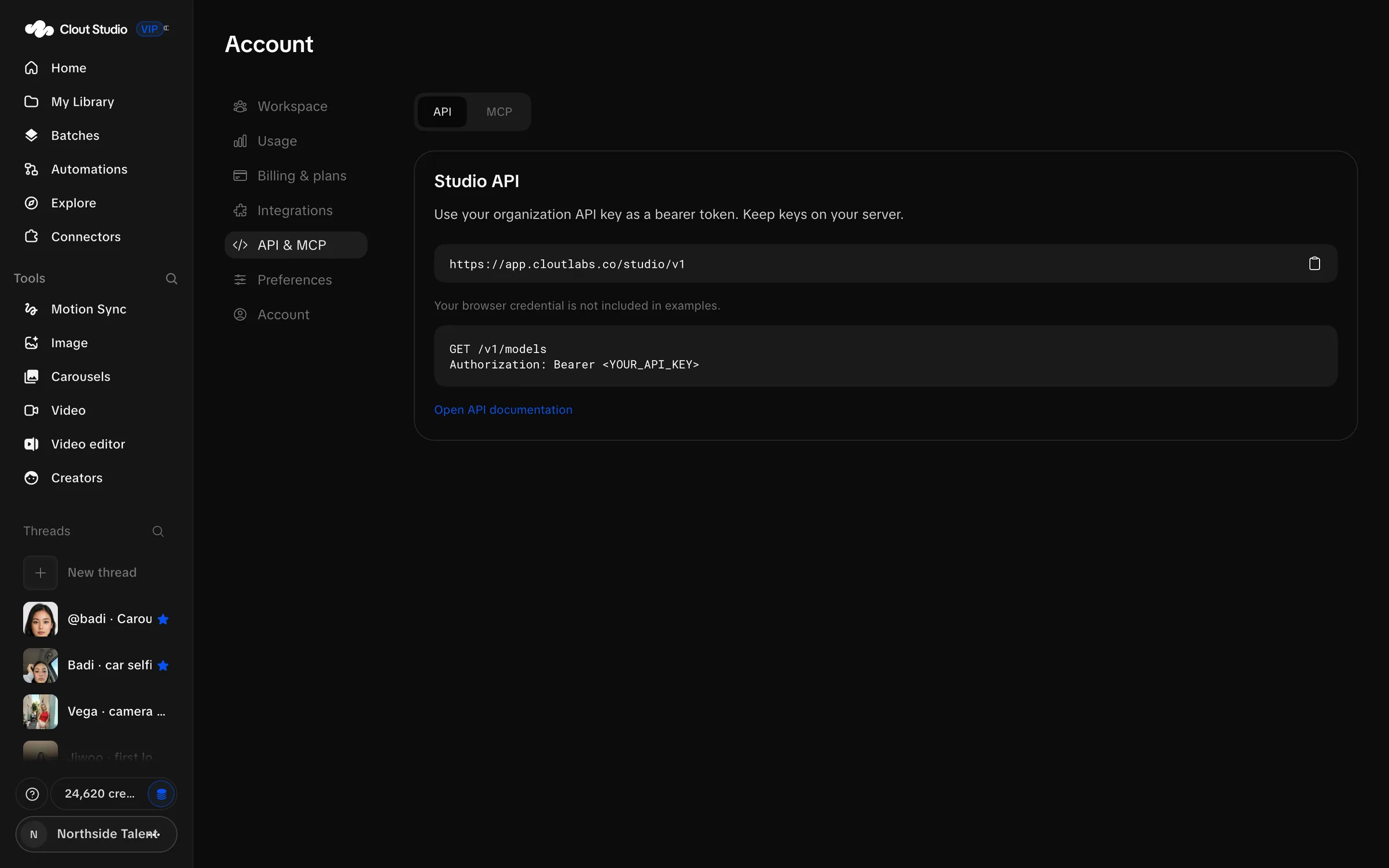
An integration uses its workspace’s organization key as Authorization: Bearer authentication. Keys are scoped to that organization. Use a key supplied for your integration; the read-only key created in AI assistants is not a generation key.
This read example uses an environment variable rather than putting a key into a script:
curl --fail --silent --show-error \
  -H "Authorization: Bearer $STUDIO_API_KEY" \
  'https://app.cloutlabs.co/studio/v1/models'
Main endpoints
Paths below are relative to the API base ending in /v1. Read the live schema before implementing writes or the larger workflow payloads.
| Method and path | Purpose |
|---|---|
| GET /me | Workspace identity, recorded usage and credit information. |
| GET /models | Image model catalog and request capabilities. |
| GET /creators | Creators in the organization. |
| POST /creators | Create a Creator. |
| GET /creators/{name} | Creator status, references and training state. |
| POST /creators/{name}/runs | Start a Creator pipeline run. |
| DELETE /creators/{name}/runs/{run_id} | Cancel the specified run. |
| GET /creators/{name}/set | Working training dataset. |
| POST /creators/{name}/set/upload | Upload dataset images. |
| GET /creators/{name}/loras | Published trained versions for a Creator. |
| GET /loras/{lora_id}/download | Download a published LoRA. |
| POST /uploads | Upload one reference image as multipart field file. |
| POST /generations | Queue an image request; returns HTTP 202. |
| GET /generations | List recent image requests. |
| GET /generations/{gen_id} | One image request and its results. |
| GET /generations/{gen_id}/zip | Download that request’s images. |
| DELETE /generations/{gen_id} | Cancel unfinished generation work or delete a completed generation. |
| GET /threads | Active creation threads. |
| GET /threads/{thread_id} | One thread and its creation history. |
| GET /library | Library folders, uploads and item metadata. |
| GET /video-plans/config | Video workflow model configuration. |
| POST /carousel-planning | Submit an editable storyboard plan. |
| GET /carousel-planning/{job_id} | Check the submitted planning job. |
The storyboard planning endpoints remain separate from rendered Carousel Studio sets. For video, editing, batches, carousels, workflows, posting and connectors, the OpenAPI reference provides the complete endpoint families and schemas. Do not treat the short table as a replacement for those payload definitions.
Video and production endpoints
| Method and path | Purpose |
|---|---|
| GET /video-plans/quote | Quote a supported video setup. |
| POST /video-plans | Prepare a video plan and editable prompt. |
| POST /video-plans/generate | Queue the full video workflow; HTTP 202. |
| POST /video-plans/{plan_id}/render | Render a prepared plan with the reviewed prompt; HTTP 202. |
| GET /video-plans/renders/{render_id} | Inspect a render and its state. |
| POST /video-plans/renders/{render_id}/retry | Retry that render. |
| GET /video-editor/assets | List video assets. |
| POST /video-editor/projects | Create an editing project. |
| GET /video-editor/projects/{pid} | Read a project and revision. |
| PUT /video-editor/projects/{pid} | Save a project against its revision. |
| POST /video-editor/projects/{pid}/jobs | Queue an export; other job kinds depend on server availability. |
| GET /video-editor/jobs/{jid} | Inspect the queued editing job. |
| GET /batches | List batches. |
| POST /batches | Create a source batch. |
| POST /batches/{bid}/launch | Launch the selected ready work. |
| PATCH /batches/{bid}/verdicts | Record review decisions. |
| GET /workflows/catalog | Read the node definitions and fields. |
| POST /workflows | Create a graph. |
| PUT /workflows/{wid} | Save graph changes. |
| POST /workflows/{wid}/runs | Run the workflow. |
| GET /workflows/{wid}/runs | Inspect its runs. |
| POST /workflows/{wid}/enable | Change scheduled activation. |
| GET /carousel-studio | List rendered carousel sets. |
| GET /carousel-studio/{thread_id}/{run_id} | Read the set, sources and take history. |
| POST /carousel-studio/{thread_id}/{run_id}/slides/{k}/remake | Queue a new take of the selected slide. |
| POST /carousel-studio/{thread_id}/{run_id}/pass | Queue missing quality passes. |
| GET /carousel-slides/{gid} | Inspect the saved render recipe. |
| POST /carousel-slides/{gid}/check | Check a take for defects. |
| POST /carousel-slides/{gid}/keep | Choose the kept take and image index. |
| GET /posting/posts | List calendar posts. |
| GET /teams/current/members | List workspace members. |
| POST /teams/current/invites | Create a role-scoped invitation. |
Video model identifiers are scail-2, wan-3.0, wan-3.0-prime, seedance-2.5 and heygen-video-1. A video plan distinguishes performance (motion or dialogue), mode (faithful, reinterpret or original), source_video, condition_on_source, creator, starting_frame, duration, resolution, aspect_ratio and audio (preserve_source, generate or silent). The count range is 1–4.
The full-generation request also requires request_key and expected_micro_usd. The request key is 16–64 letters, numbers, underscores or hyphens. Quote the chosen setup and follow the current schema before submitting it; do not guess a price or reuse settings from another workflow.
Revisioned edits and idempotent paid submissions have different concurrency rules. Read the endpoint’s required revision or request key, preserve a local edit on conflict, and inspect the existing record after an interrupted response.
Image generation request
POST /generations accepts these fields. Use the image catalog identifiers for model.
| Field | Default and accepted values |
|---|---|
model | Required model identifier. |
prompt | Empty string by default; at most 32,000 characters. |
thread_id | Optional existing thread identifier. |
slide_of | Optional carousel parent identifier; 32 lowercase hexadecimal characters. |
creator | Optional Creator name; one Creator per request. |
identity_mode | auto, references or lora; default auto. |
lora_id | Optional published version identifier; must fit the Creator and model. |
count | Default 4; from 1 to 8. |
aspect | Default 3:4; 16:9, 4:3, 1:1, 3:4 or 9:16. |
resolution | Default 2k; 1k or 2k. |
seed | Default null; integer from 0 to 2,147,483,647. |
strength | Default null; API range 0–2, subject to model compatibility. |
attachments | Upload identifiers; at most four. |
attachment_roles | Up to four edit_base, scene_reference or pose_reference roles. An edit base must be first and there can be only one. |
pose_lock | Default false; depth guidance needs a suitable attachment and LoRA request. |
enhance | Default true; used by the Auto route. |
The queued response includes id, thread_id, creator, model, modelName, prompt, params, status, images, error, microUsd, credits, secs, requestedAt, startedAt and finishedAt.
Statuses are queued, running, succeeded, failed and cancelled. Each result image has key, url, w, h, seed and an optional model. Poll the returned identifier to read completion. A 202 response means accepted, not finished.
GET /generations accepts creator, limit and before. The default limit is 60, with a range of 1–200. Use the oldest record’s requestedAt as the before timestamp for the next page.
POST /uploads returns id, url, w and h. Reference files are limited to 25 MB. Use the returned identifier in attachments, not the file’s URL.
Hosted MCP connection
Open Connectors → AI assistants. The hosted address is:
https://mcp-studio.cloutlabs.co/mcp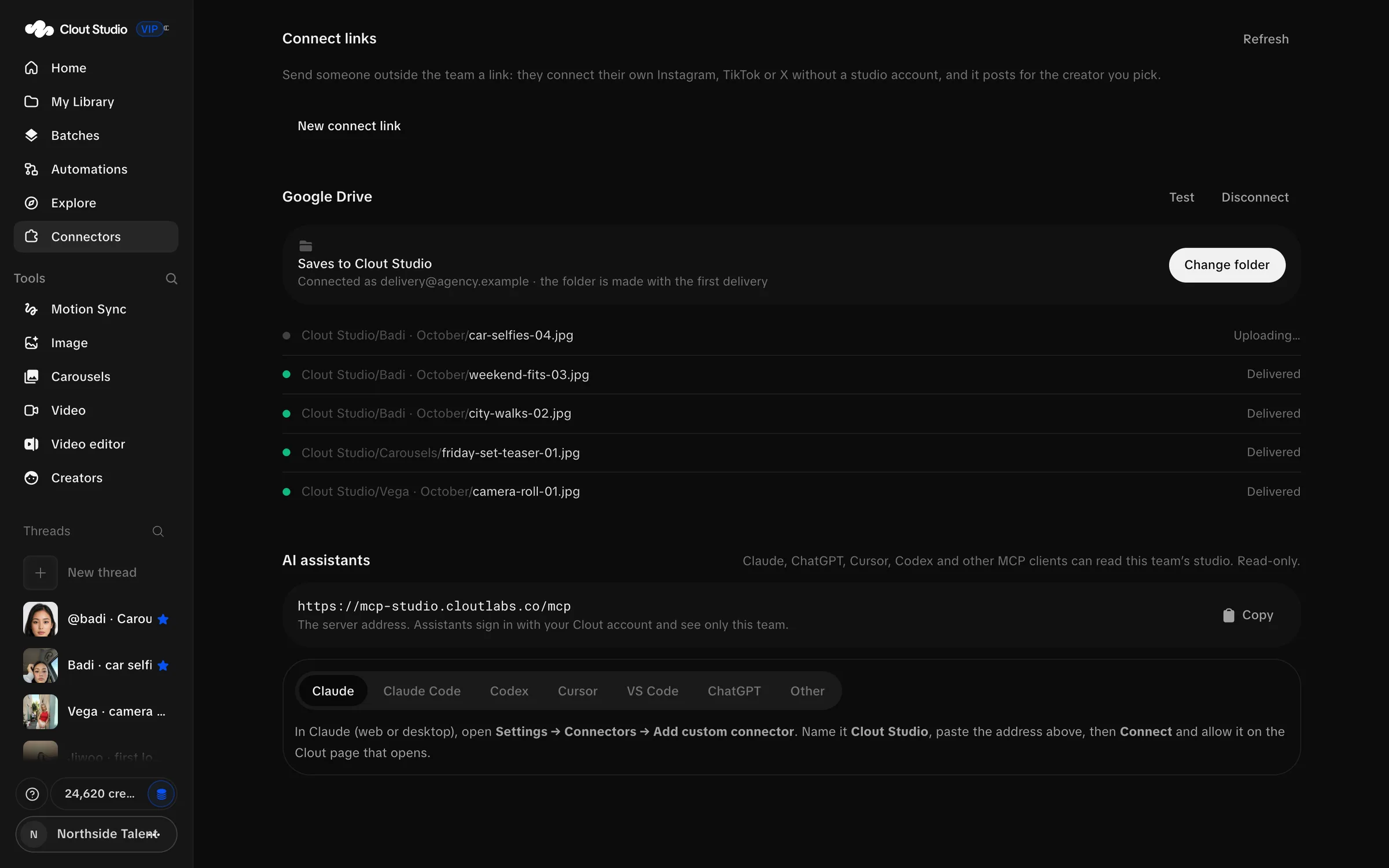
Add that address in an MCP client that supports HTTP and OAuth. Complete the Clout consent page for the workspace you intend to expose. The consent screen identifies the client, team and redirect destination.
The connection is pinned to that team. Switching your active workspace later does not silently move the assistant connection to another team.
The published tool set contains nine read tools. An assistant can read Studio; it cannot generate, post, spend credits, delete or edit content. Use Disconnect on the connection to revoke it.
For a client that takes an authorization header instead, select Other, enter Key name and choose Make a key. The read-only key is shown once. Store it securely and send it as a Bearer header. Do not put the value into prompts, screenshots or shared configuration files.
MCP tools
| Tool | Arguments and result |
|---|---|
studio_usage | No arguments; workspace usage and identity. |
studio_creators | No arguments; available Creators. |
studio_models | No arguments; image model catalog. |
studio_video_models | No arguments; supported video workflows, formats and qualities. |
studio_threads | No arguments; active creation threads. |
studio_thread | thread_id; one thread with image and video history. |
studio_generation | generation_id; request metadata, prepared prompt and results. |
studio_recent_images | Optional creator, limit and before; default limit 20, range 1–200. |
studio_library | No arguments; folders, uploads and organization metadata. |
Errors and integration safety
| HTTP status | Check |
|---|---|
| 400 | The payload, model compatibility or media input. |
| 401 | Authentication. |
| 403 | Workspace access, role or read-only connection restrictions. |
| 404 | The identifier and the workspace it belongs to. |
| 402 | Available credits for the requested work. |
| 413 | Upload size. |
| 429 | Concurrent generation limit. |
Keep write integrations server-side. Check the existing job after a connection interruption before submitting paid work again. For carousel planning, request_key identifies a submission: repeating it with the same payload reuses the job; different settings with that key return 409.